What to Check Before Choosing a Wearable Lone Worker Alarm
Choosing a wearable lone worker alarm is less about picking the smallest device and more about matching the device to the way people actually work. A lone worker might be in a garage bay, on a rural property, visiting a client, walking a route, or spending time in a building where mobile coverage shifts from room to room. The right setup should make an alert easy to raise, easy to route, and clear enough to act on.
Before comparing models, it helps to write down the real working conditions. Think about where staff go, whether they are moving or stationary, what risks are reasonable to plan for, and who would need to respond. That short brief makes the feature list far easier to judge.
Start with the alarm functions that match the work
The first check is whether the device supports the alert types your workplace needs. Many roles need a deliberate SOS action, such as pressing a button when someone feels unsafe or needs help. Others need automatic alerts when a person stops moving, falls, or appears to be in trouble after a period of inactivity.
Man down and fall detection are useful terms to understand before comparing products. Man down alerts are generally designed around a person becoming stationary or upright in an unexpected way, while fall detection focuses on a sudden impact or change in position. Neither feature removes the need for good work planning, but they can reduce the time between an incident and a response.
A two way voice alarm can matter when an alert alone does not give enough detail. Voice contact can help a responder understand whether the worker needs urgent help, can move safely, or simply needs reassurance. It also helps when the location is unclear. If voice communication is part of your response plan, check how the call is opened, who can speak, and whether the worker can hear clearly in noisy surroundings.
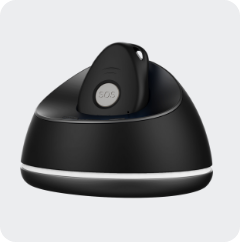
Automatic alerts and manual alerts should be treated as different tools. A worker who handles machinery may need a quick manual trigger rather than a device that depends on movement patterns. A person visiting isolated sites may benefit from both. The best choice usually comes from the job, not from the longest feature list.
Ask who receives the alert and what happens next
An alert is only useful if it reaches someone who can act. Ask who the alert recipient is, whether that can be more than one person, and whether escalations are possible if the first recipient does not respond. A lone worker system should fit the workplace policy, not sit outside it.
It is worth mapping the response path in plain language. When an alert arrives, who sees it first? What information appears with it? Can that person acknowledge it, call the worker, contact emergency services, or ask a nearby colleague to attend? Clear answers here matter more than a device that looks impressive in a catalogue.
Also check what happens when the recipient is unavailable. After hours, weekends, and remote work can change the response arrangement. A workplace may need alerts to reach a nominated contact rather than a single desk. If multiple teams are involved, make sure the system can show who is responsible at the time.
Check location accuracy in the places staff actually work
GPS is often useful outdoors and in vehicles, but location reporting can become less precise inside buildings, underground, or in dense urban areas. WiFi positioning and GSM triangulation may help in some settings, though accuracy can vary. Ask how the device reports location when a strong GPS fix is not available.
Compare the location details that appear with an alert. A coordinate alone may be hard to use if the responder is unfamiliar with the site. A street address, site name, building level, or last known location can make a practical difference. For workers who move between locations, check whether location updates are frequent enough to show direction and recent movement.
Think about routine routes as well as fixed sites. A worker who travels between properties may need location history that is easy to interpret. A worker inside a large facility may need coverage that identifies the correct building or zone. These needs are different, so a single location claim should not be treated as suitable for every role.
Look closely at battery life and daily handling
Battery life affects whether a device is trusted or left on a shelf. Ask how long the battery lasts under normal use, how long it lasts when location reporting is active, and what happens when charge is low. A wearable lone worker alarm should fit the rhythm of a shift without creating constant charging worries.
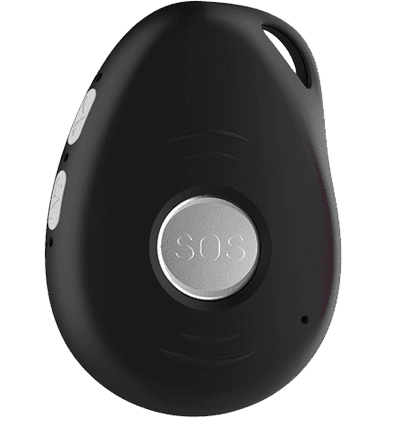
Check how the device is carried. Some staff prefer a clip, badge, belt mount, or wrist option. The best option is the one that stays on the body and remains reachable in an emergency. If a worker often wears gloves, carries tools, or moves through tight spaces, button size and screen readability deserve attention.
Ask about low battery alerts, charging time, and whether the device gives a clear signal when it is not ready to use. A simple routine, such as checking the device at the start of a shift, can help, but that routine should not be the only safeguard.
Test how alerts work before rolling them out
Device testing should be part of the decision. That does not need to be complicated. A practical test checks whether the alert can be raised, whether the right recipient gets it, whether location details are understandable, and whether voice contact works at a sensible volume.
Testing should include the places where the device will be used. Coverage can change between a car park, a storeroom, a rural boundary, and a busy street. If an alert fails or arrives late during a trial, that is useful information. It is far better to find the problem before the device becomes part of normal work.
The same applies to automatic alerts. Check how the device responds to ordinary movements that are part of the job. Bending, lifting, sitting, climbing into a vehicle, or setting down a tool for a short period should not create confusion. If false alerts are common, people may start ignoring them, which weakens the whole system.
Compare communication quality, not just call features
Two way voice communication can be valuable during an alert, but quality varies with the environment. Check whether the worker can speak without holding the device in an awkward position. In noisy areas, a clear speaker and microphone can make the difference between a useful conversation and repeated questions.
A two way voice alarm should also be considered alongside privacy and workplace expectations. Staff should understand when voice contact is used, who may listen, and how alerts are handled after the event. Clear expectations help people feel comfortable using the device when they need it.
It is also sensible to check what happens if a call is not answered. Some roles need a quick response, while others can tolerate a short delay. The response plan should reflect the level of risk and the time it may take for help to arrive.
Review reporting, records, and ongoing use
After an alert, records can help a workplace understand what happened and whether the response worked. Check what activity logs are available, how alerts are labelled, and whether reports can be exported. Useful records should be readable, not just stored.
Reporting also supports training. If false alerts, missed check ins, or repeated coverage problems show up, they can be addressed before someone relies on the device in a difficult moment. Any changes to work routines should be reflected in the workplace policy so expectations stay clear.
Finally, check how the device fits existing procedures. A wearable lone worker alarm should support the way staff report concerns, escalate incidents, and check in during higher risk tasks. When the technology and the procedure point in the same direction, the system is easier to use and easier to trust.